
The Supreme Court ruled in February against the President’s use of the IEEPA statute to impose duty tariffs in response to the opioid threat and reciprocal duty tariffs. In response, the President invoked the established statute in Section 122 to impose a duty tariff that replaces those previously imposed under IEEPA to maintain these tariffs. Additionally, the established statutes of Section 301 and Section 292 were invoked.
IEEPA Duty Tariffs Refund Program
Customs and Border Patrol (CBP) indicated there will be at least two- three phases of the IEEPA duty refund process, starting with Phase 1, which began on April 20th and is now complete. Phase 2 began on June 29, 2026, and is currently underway.
Phase 2
Phase 2 of the IEEPA tariff refund process launched on June 29, 2026. The process for submitting refund requests is the same as in phase 1.
What is included in Phase 2?
Phase 2 will cover reconciliation. Reconciliation is when a post-entry correction has been submitted within 300 days from the entry date but not liquidated, including those that have either not yet liquidated or have liquidated but remain within the applicable post-liquidation correction period of 180 days. If DHL Express cleared the shipment as the customs broker, these would be the entries where you may intend to file a duty billing dispute with DHL Express through DHL MyBill or by email, or if the duty dispute is still in process with CBP. It also includes other types of entries below. Import entries you have already disputed with DHL Express, and have been resolved, were processed in Phase 1. See our article Disputing Duty and Tax Charges | Preferred Shipping.
Phase 2 follows Phase 1, which was limited to unliquidated entries and entries within 80–90 days of liquidation.
Eligible Entries in Phase 2
- Entries flagged for reconciliation entry types 01 Consumption, 02 Consumption Quota/Visa, 06 Consumption Foreign Trade Zone, for which the reconciliation entry type 09 Reconciliation Summary has not been filed. Consistent with CAPE Phase 1, the entries flagged for reconciliation will be limited to unliquidated entries and entries that have been liquidated within 80 days of the CAPE declaration filing date.
- Entries under protest, or drawback claims.
- Customers should retain all supporting documentation (entry summaries, commercial invoices, proof of duty payment) to ensure eligibility and smooth processing.
Processing Timeline
Once a CAPE Phase 2 declaration is accepted, refunds are generally issued within 60–90 days, like Phase 1 processing. Importers should ensure that their ACH Refund Authorization information is correctly set up in the ACE Portal, as CBP does not issue refunds by paper check.
The process for submitting eligible Phase 2 entry refund requests is the same as in Phase 1.
For either Formal Entry (Value above $2,500) or Informal Entry (Value below $2,500)
-
- Importer (You) is listed as the Importer of Record:
- In this scenario, the customer must use the CBP-ACE system and the Consolidated Administration and Processing of Entries (CAPE) process. Even when DHL Express was the customs broker for the import, if you were the Importer of Record for the entry, you must follow the CAPE process in the ACE system.
- DHL Express is listed as the Importer of Record:
- As the customer’s broker and Importer of Record for these customs entries, DHL Express will automatically submit eligible imports to customs for a refund on behalf of the customer. IEEPA credit (including interest) will be posted to the customer’s AR account within SAP-AR. The credit will be visible in MyBill (Invoice Type = IEEPA Refund) and will also appear on statements. Customers will be able to elect to apply the credit to another open invoice or request a check. Account holders who wish to request a check should contact their assigned Collections agent for next steps.
- Importer (You) is listed as the Importer of Record:
Viewing and Applying Your IEEPA Refund When DHL is the Importer of Record
- If a customer has received an IEEPA refund, they can view it easily through DHL MyBill on the first page of their Dashboard.
- To assist with reconciliation
- The AWB number for the IEEPA refund is noted under the invoice column
- Customers can use the SEARCH tab to enter the AWB number, providing them with access to corresponding duty invoice/customs documentation

- To assist with reconciliation
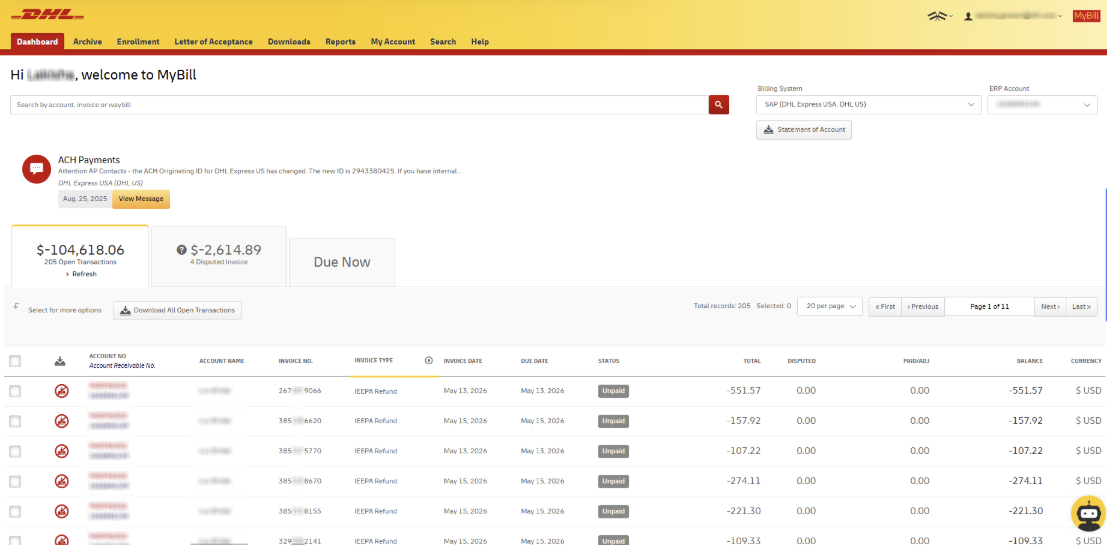
IEEPA Application / Refund Options:
- You are able to make a payment of an invoice using their the IEPPA credit by selecting the IEEPA credit and invoice, then clicking the ‘Pay ’ button. Please note that the total of the debit invoices will need to exceed the selected IEEPA credits, resulting in a charge against that card, bank account or Paypal from for the remaining balance.

If you are not able to apply an IEPPA credit against an open invoice, there are three options:
-
-
- Contact Preferred Shipping Customer Service for your assigned collector
- Call billing customer service 1-800-722-0081
- Email Billing.Help@dhl.com
-
Statement of Account (IEEPA Example)
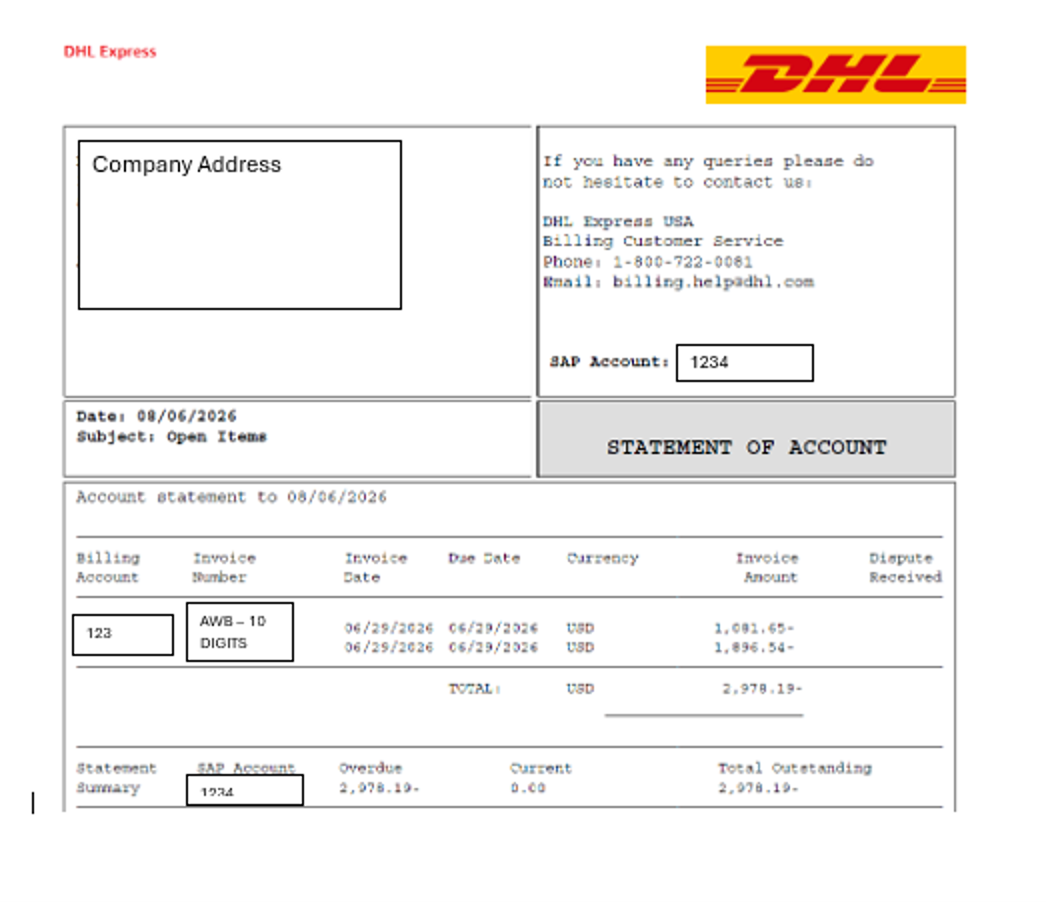
- DHL is sending out a Statement of Accounts – the one you see above is for an IEEPA refund
- The monetary value captured with a minus sign is a credit
- Invoice field captures an AWB number
- The overdue amount, as it is captured with a minus sign, is a credit
If you had an outside customs broker for the shipment instead of DHL, please consult your customs broker regarding the IEEPA refund.
How to determine who is the Importer of Record?
Customers can use DHL MyBill to determine this.
- Go to the Archive Dashboard
- Download your Customs Duty Invoice
- Look at the Entry Type
- If it is Entry Type 01, the customer is the Importer of Record


ACE System
Customers who were the Importer of Record must submit their refund request in the CBP ACE system, and must be registered for an ACE ACH refund account to receive their refunds. CBP will NOT be issuing checks.
- Here are the instructions:
Checklist for when you are the Importer of Record and must file in the ACE CAPE process:
- Confirm who is the Importer of Record (IOR) for each entry (via CBP Form 7501).
- Note your IR number (Importer ID) — typically your EIN/Tax ID.
- Set up (or confirm) your ACE Secure Data Portal (ACE Portal) Importer Account.
- Enroll for ACH refunds in ACE (bank account info) so CBP can pay refunds electronically.
- Compile your list of eligible entries (Phase 1: unliquidated and certain entries within 80 days of liquidation) You will need the entry number.
- Prepare and upload the CAPE Declaration .CSV using the ACE CAPE template (max 9,999 entries per upload).
- Compile your list of eligible entries (Phase 1: unliquidated and certain entries within 80 days of liquidation) You will need the entry number.
- Enroll for ACH refunds in ACE (bank account info) so CBP can pay refunds electronically.
- Set up (or confirm) your ACE Secure Data Portal (ACE Portal) Importer Account.
- Note your IR number (Importer ID) — typically your EIN/Tax ID.
Additional Resources:
CBP Webpage on IEEPA Refund
CBP EEPA Refund Guidance Bulletin
ACE Support
- ACE Portal and ACH Refunds FAQs | CBP
- Electronic Refund Enrollment in CBP’s ACE Portal
- ACE Portal Application for Importers Resource | CBP
Frequently Asked Questions (FAQs)
What is the 2026 IEEPA duty refund program?
- CBP is making a refund mechanism available for certain duties that were imposed under the International Emergency Economic Powers Act (IEEPA). Phase 1 began on April 20, 2026, and transitioned to Phase 2 beginning on June 29, 2026. Phase 3 will be announced later in July 2026. Refunds are requested through one of two paths, depending on who is listed as Importer of Record (IOR): (a) DHL Express as IOR (DHL must file), or (b) you/your company as IOR (your files in ACE using the CAPE process).
How do I know whether DHL Express or my company is the Importer of Record (IOR)?
- In DHL MyBill, locate the shipment duty invoice in history/Archive and view the duty invoice. Look at the “Entry Type” invoice column and if it says “Type 01” then you were the Importer of Record for the entry. Next in DHL MyBill on the invoice line click on the invoice number and on the invoice line item click on the “Image” button and open the customs documents. Look for the CBP Form 7501 (Entry Summary) which shows your company as the Importer of Record. You will need the entry number from this document. If you are the Importer of Record, you must submit the refund request through ACE using the CAPE process. When DHL Express is the Importer of Record, DHL must submit the refund request for that entry.
What is the “IR number” asked for in the ACE account application and what should I use for it?
- The IR number is your Importer ID number. For most businesses, this is the same as your Tax ID / EIN. (Individuals may use their SSN when acting as importer, but most commercial shipments use an EIN.)
Do I need an ACE account to request refunds (if I’m the IOR)?
- Yes. Refund requests are submitted through CBP’s web-based ACE Secure Data Portal (ACE Portal) as a CAPE Declaration upload. Importers of Record (and/or authorized customs brokers) need an established ACE Portal account, and the filer must be the IOR for the listed entries (or the broker that filed those entries on the IOR’s behalf).
-
If you encounter an error with the system accepting your email address during the ACE Importer Application process, it is due to someone in your organization already being registered as the ACE import account owner. If you are unable to determine who that contact is, we can assist you with changing the ACE import account owner to the contact and email you want so you can complete your application. Just reach out to our Customer Service Team and provide us with your EIN/Tax ID number, name, and email address of whom should be the ACE Import account owner.
What is the ACE application for importer process?
- Importers who are the Importer of Record need to (1) apply for an ACE Portal Importer Account, and (2) enroll for electronic refunds by providing bank account information to CBP through the ACE Portal (ACH refunds). This enables CBP to issue approved refunds electronically. ACE Portal Application for Importers Resource | CBP
How do I compile my list of shipment entries using DHL MyBill?
- In DHL MyBill, pull each import shipment from your duty invoice history (often found under Archive), then open the shipment’s customs documents. Use the CBP Form 7501 (Entry Summary) to capture the entry number identifier(s) you’ll need for CAPE. Build a running list as you review shipments and keep a copy of the 7501s for your records.
What is the time frame for Phase 2 of the refund process?
- CBP launched Phase 2 of CAPE on June 29, 2026. Phase 1 is limited to Entries flagged for reconciliation entry types 01 Consumption, 02 Consumption Quota/Visa, 06 Consumption Foreign Trade Zone for which the reconciliation entry type 09 Reconciliation Summary has not been filed. Consistent with CAPE Phase 1, the entries flagged for reconciliation will be limited to unliquidated entries and entries that have been liquidated within 80 days of the CAPE declaration filing date.
- If your entries fall outside Phase 2, they may be handled in Phase 3 or require a different administrative path.
What is the ACE CAPE process?
- CAPE (Consolidated Administration and Processing of Entries) is CBP’s mechanism in ACE for filing IEEPA duty refund requests in bulk instead of filing entry-by-entry. You submit a “CAPE Declaration” that is essentially a list of entries numbers for which you are requesting IEEPA duty refunds. CAPE Declarations are uploaded through the ACE Portal (not through ABI).
What is the CAPE spreadsheet format and what information is required?
- CBP requires the CAPE Declaration to be uploaded as a Comma-Separated Values (.CSV) file using the CAPE template available in the CAPE tab of the ACE Portal. Phase 1 is designed so that the upload contains only the entry number list required by CBP’s template (CBP indicates no additional data fields are required beyond what the template specifies). Each individual CAPE Declaration upload is limited to 9,999 entries; you can submit multiple CAPE Declarations if needed.
Who can submit a CAPE Declaration—me or my broker?
- Only the Importer of Record for the listed entries, or the authorized customs broker that filed those entries on the IOR’s behalf, may file the CAPE Declaration in ACE.
- Yes, as long as DHL Express was the customs broker for the shipment (most common) DHL will assist our customers for a fee, when our customers are unable to self-file. If you are needing this option, you must determine which import shipments have you listed as the Importer of Record and compile a list. Your list of eligible imports can either be a list of air waybill (tracking) numbers or the import entry numbers listed on the 7501 Entry Summary, or both. You will need this list when making your request to DHL Express to file on your behalf. DHL Express will charge A standard Import Paperwork Fee to file on your behalf. Once you have your list of eligible imports go to the IEEPA DHL Request form to submit your request and upload your list of elidable imports. Please note you still need to set-up a CBP ACE ACH account so that CBP can transfer your refund to you once it is approved.
What were the details for Phase 1?
- Formal entries cleared (valued above $2500 or requiring other government agencies) from March 22, 2025, through February 24, 2026.
- Informal entries cleared (valued below $2,500) from January 30, 2026, through February 24, 2026.
- The scope for low-value shipments (informal entries) is expected to be small in Phase 1.
IEEPA refund claims could not be filed in Phase 1 for the following entries, and customers are advised to wait for additional instructions from CBP.
- Non-electronically filed entries
- Entries outside of the above dates
- Entries subject to special circumstances found here:
If you have additional questions, you can contact our Customer Service Team at customerservice@preferredship.com or 1-800-827-7987.